Download Instagram videos without a watermark
More people ask about watermarks than about anything else, and the worry is reasonable. Plenty of tools stamp their own name across the corner of your file, or tack a branded second onto the end, and there is no way to remove it afterwards without cropping the picture or cutting the clip short.
That happens because of how those tools work. They open the video, draw something on top of it, and write out a new file. Re-encoding like that costs a little sharpness every time, so you end up with a marked video that is also slightly worse than the original.
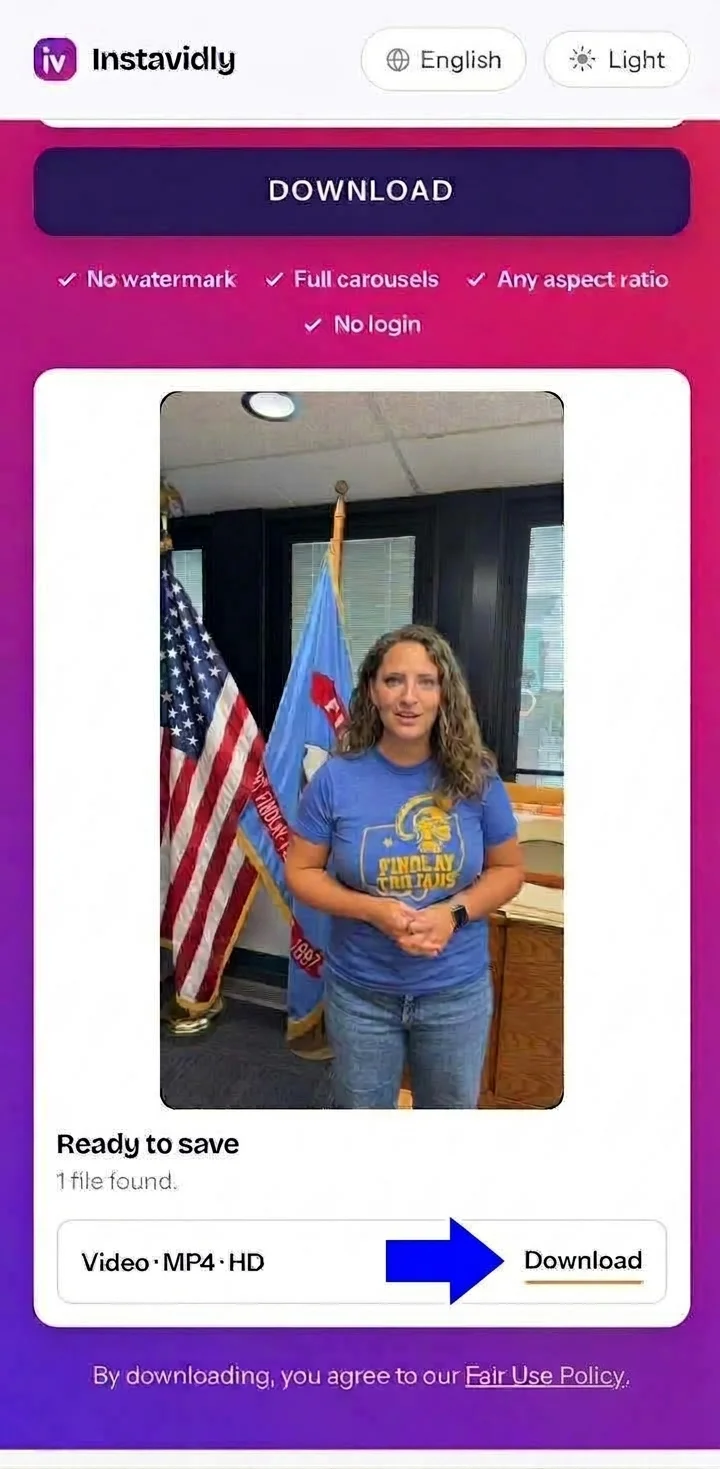
Nothing here opens your file. The post is looked up, the media address behind it is read, and the bytes pass straight through to your device. There is no point at which anything could be drawn onto the picture, which is why what you save is identical to what Instagram serves.
It is worth knowing that a watermark already burned into a video by its creator cannot be taken off by any tool, here or anywhere. If someone exported their clip from an editing app that adds its own logo, that logo is part of the picture now, in the same way the background is. Removing it would mean painting over real image data, and anything claiming to do that is guessing at what used to be underneath.
Do you need an Instagram video downloader app?
An installed app and a page like this one end up doing the same thing, so the question is really about what each costs you.
An app needs storage permission before it can write a single file, occupies space whether you use it weekly or twice a year, and sits in the background consuming a little battery. Many pay for themselves with full-screen adverts that appear between you and the video you came for.
The deeper problem is maintenance. Instagram adjusts how it serves media several times a year, and an app breaks until its developer publishes a fix and you install the update. A website is mended centrally, meaning the fault has already disappeared by your next visit. You never run an outdated copy without realising.
There is also where these apps come from. Download tools are pulled from the Play Store and the App Store regularly, which pushes many of them onto websites offering a file to install by hand. Sideloading software from outside an official store is one of the most common ways phones end up with something unwanted on them, and it is a poor trade for a task that takes ten seconds in a browser.
If what you actually want is the convenience of an icon, add this page to your home screen. It then opens in one tap, behaves like an app, and still weighs nothing.
Posts with more than one video
A carousel can hold up to twenty slides, and those slides can be videos, images, or a mixture of the two. Instagram gives you no way to save them, and swiping through to screen-record each one loses quality and picks up your own interface along the way.
Paste the post link once and every video inside it is listed separately, numbered in the order the creator arranged them. You can take a single slide or work down the whole set, and mixed posts return their images alongside the videos rather than dropping them.
The order matters more than it sounds. Carousels are often used for sequences — a recipe across six steps, a tutorial building on itself, a before and after. Keeping the numbering means the files land on your device in a sensible order instead of arriving as a jumble you have to sort out later.
One thing a carousel never holds is a story. Those are posted separately and disappear after a day, so they are not part of a feed post at all. If that is what you came for, the Instagram story downloader handles them, including the ones an account has pinned to its profile.
Square, portrait and widescreen videos
Feed posts are not one shape. Square at 1:1 was the original Instagram format and is still common for brands. Portrait at 4:5 is taller and takes up more of a phone screen, which is why it has become the default for most creators. Widescreen at 16:9 shows up when someone posts something filmed on a camera rather than a phone.
Whatever the shape, the file arrives exactly as published. Nothing is cropped to make it fit a standard frame, and nothing is padded out with black bars to fill one. A square video stays square, and a widescreen clip keeps its full width.
This is worth checking if you plan to reuse footage you have permission to use, because a video cropped by a downloader cannot be uncropped. Starting from the untouched file leaves every option open.
Can you download Instagram videos in 4K?
The honest answer is almost never, and the reason has nothing to do with the tool you use.
Instagram re-encodes everything uploaded to it. A creator can film in 4K, export in 4K and upload in 4K, and the version stored for public viewing will still cap out at roughly 1080p on the long edge. The original never reaches Instagram's public servers, so there is nothing anywhere for a downloader to fetch.
Any site advertising 4K Instagram downloads is doing one of two things. It is either upscaling a 1080p file to a 4K frame size, which multiplies the pixels without adding any actual detail and leaves the video looking soft, or it is simply putting the label on a button and serving the same file as everyone else.
What is genuinely worth asking for is the untouched original as Instagram holds it, at whatever resolution that turns out to be, with no second compression on top. That is exactly what this page hands you.
Where your video saves
Your browser decides where the file lands, and that differs between devices.
On iPhone
Safari stores what you save inside the Files app, not the camera roll. Tap the download arrow next to the address bar to jump straight to it. To move a video across, press and hold it in Files and choose Save Video, and it appears among your recent items. Carousels are worth saving one slide at a time on iOS, since Safari handles a queue of downloads less gracefully than Chrome does.
On Android
Android drops each video straight into Downloads, and your gallery app indexes it automatically, so it turns up beside your own recordings without any extra step. A notification appears as each file finishes, and tapping it opens the video immediately.
On PC and Mac
Saved files collect in whichever folder your browser uses for downloads, usually shown in a panel or a strip along the bottom of the window. MP4 opens in every standard player, so nothing needs converting, and files from a carousel are numbered to keep their order on disk.
Is downloading Instagram videos safe?
Safety here has two halves, and they are worth separating.
The first is your account. Nothing on this page asks you to sign in, and you should treat any downloader that does as a threat rather than a convenience. Credentials handed to a third party get used, and the result ranges from unwanted posts appearing on your profile to losing access entirely. No password is needed to read a public post, so any request for one is a request for something else.
The second is your device. Because nothing is installed, there is no software that could misbehave later, no permissions to grant, and no background process left running. The only thing that reaches your device is the video file itself.
What remains is the question of what you do with the file. A public video still belongs to whoever made it. Keeping something to watch offline is unremarkable; putting it on your own account, running it as an advert, or presenting it as your own work is a different act with real consequences, including having the post removed or your account restricted.
When a video will not download
Almost every failure comes down to one of four causes.
The account is private. Private posts are blocked by Instagram before any request reaches the media, so there is nothing to retrieve. You will get a clear message rather than a page that hangs.
The post has been removed. Creators delete posts, and Instagram restricts some content by country. If the link fails to open on Instagram itself, that is your answer.
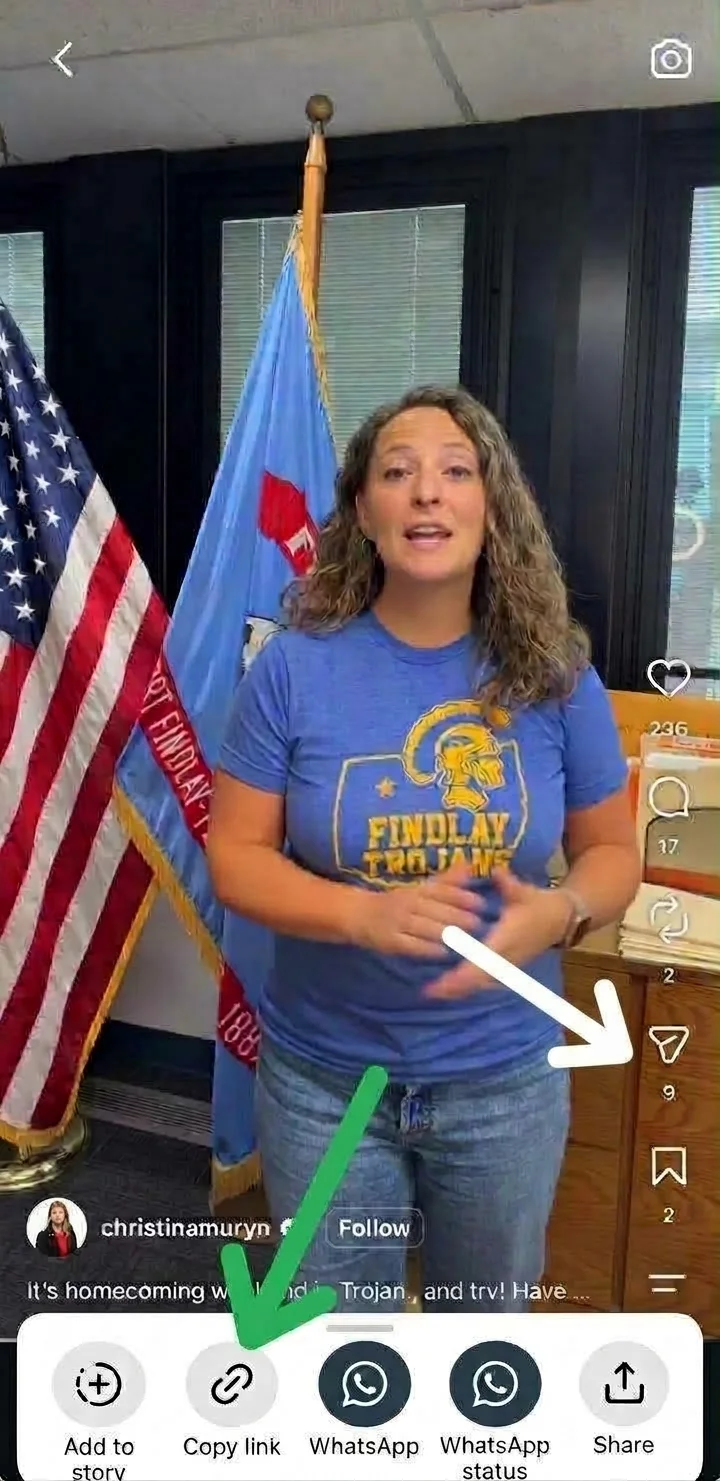
The link points at a profile, not a post. A profile address identifies an account rather than any particular video. The link you need contains /p/ followed by a short code, and the post menu always produces the right one.
Instagram changed something. This happens periodically and affects every downloader simultaneously. It is usually resolved within hours, so waiting a little and trying again is worth doing before you conclude the video is gone.
Other tools on Instavidly
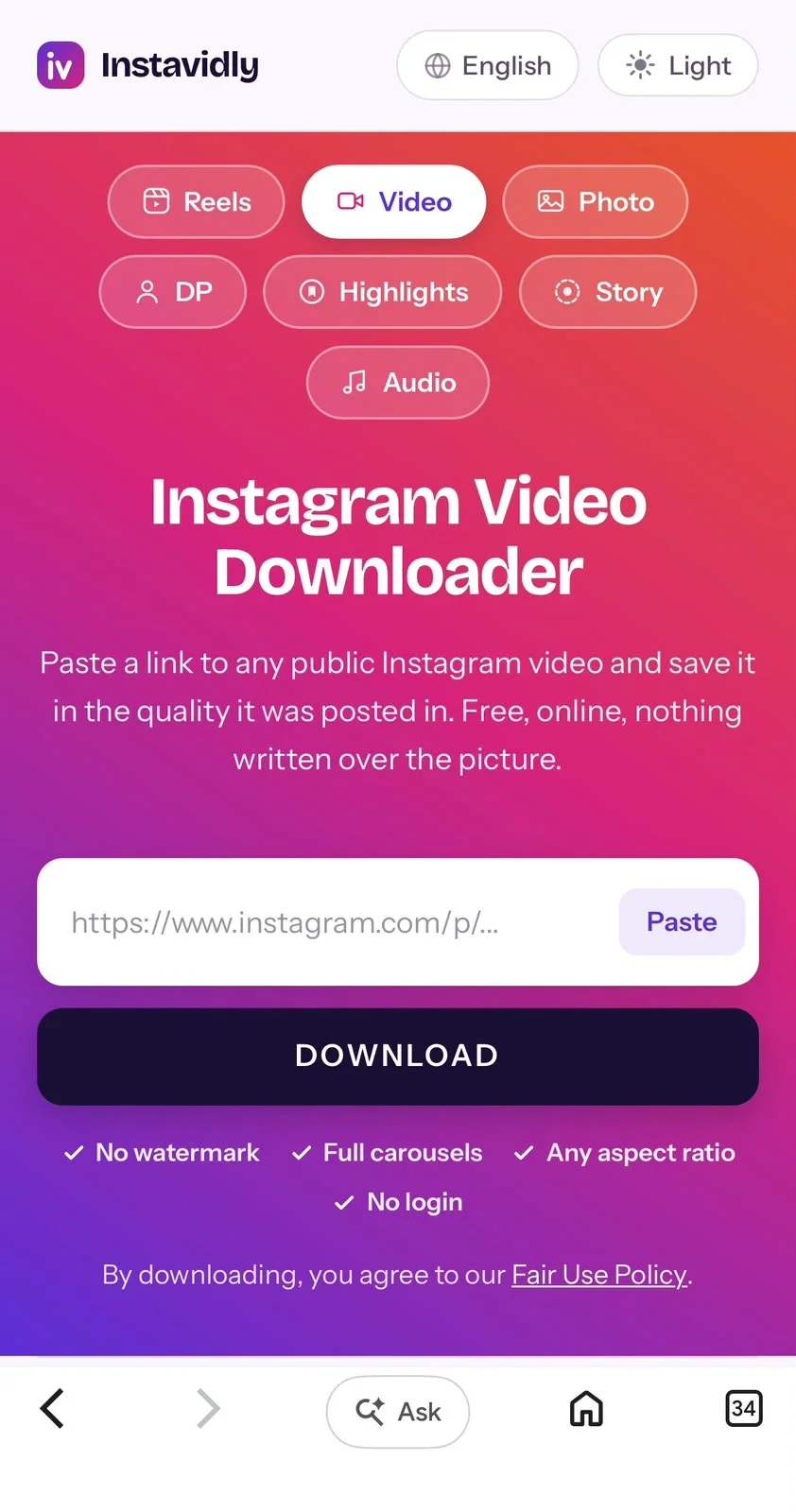
This page handles feed video posts. For anything else, these work the same way — paste a link and press Download: